
Minutes: AI Meeting Note Taker
Minutes AIProductivity
4.158.00 Reviews
- Version
- 1.4.0
- Installs
- 100.00K
- Age Rating
- Everyone
Screenshots
Our Review of Minutes: AI Meeting Note Taker
 Analysis by Appyee
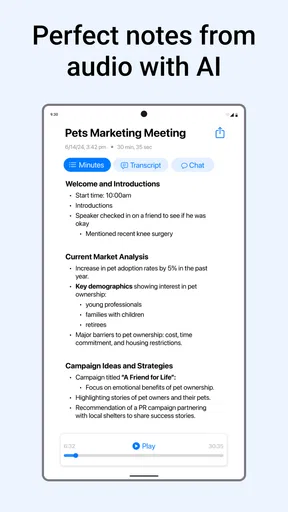
I tried Minutes: AI Meeting Note Taker as a productivity app for turning spoken conversations into something I could revisit later, and its appeal became clear almost immediately: it is aimed at people who would rather capture a meeting naturally than spend the entire conversation typing. The basic idea is simple, but the practical value depends on how well that idea fits your surroundings, your communication style, and your tolerance for checking and correcting automated notes.
Minutes is developed by Minutes AI and is available free of charge, with optional in-app purchases ranging from $14.99 to $99.99 per item. It is rated for Everyone, which makes its general audience broad, although the usefulness of an audio transcription tool still depends heavily on the situation in which it is used. I see it as a focused assistant for spoken information rather than a complete replacement for a traditional note-taking system.
How Minutes feels to read, navigate, and review
I focus on how Minutes presents a recording once I come back to it: whether the text is easy to scan, how naturally I can move between reading and checking details, and whether the workflow encourages useful review rather than leaving another forgotten file. Those small habits matter more over time than the initial novelty of turning speech into text. They also shape whether I would keep the app in my regular routine.
A straightforward idea with a practical starting point
The store summary describes the core experience as transcribing and recording voice audio, and that is the right way to understand the app. Instead of asking me to build a complicated project structure before I can capture something, Minutes is centered on getting spoken material into a form I can read afterward. That makes it especially useful when my hands are occupied, when a conversation moves too quickly for manual notes, or when I want to stay engaged with the person speaking.
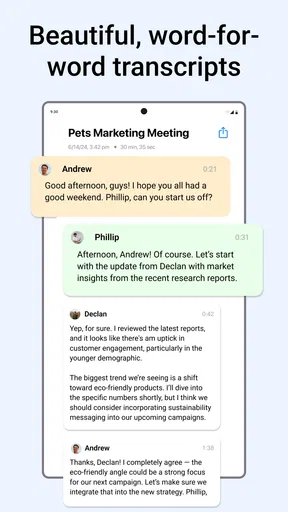
I found the biggest readability benefit after the recording rather than during it. A written transcript gives me a way to scan for a name, decision, or phrase instead of replaying an entire conversation. That matters for anyone who finds long audio difficult to search mentally, including people who process written language more comfortably than spoken language. It also makes reviewing a short discussion less dependent on memory.
Navigation is easiest when I approach the app with one clear purpose: capture a voice conversation and return to the resulting text. I would not treat it as a full workspace for every kind of productivity task. The more unrelated jobs I expect from one app, the more likely I am to miss the reason Minutes feels useful in the first place. Its strength is reducing the distance between hearing something and having a written version available.
Why the text can be more useful than a recording
Audio has an important advantage: it preserves tone and the exact flow of a conversation. However, audio also asks me to listen again in real time. A transcript changes that trade-off. I can skim a discussion, copy a useful phrase into another note, or compare what was said with what I remember. For students, freelancers, carers, interviewers, and people who regularly receive instructions verbally, that shift can make everyday information easier to manage.
There is also a less obvious benefit for people who become overloaded by fast group conversations. I can focus on participating instead of trying to divide my attention between listening and writing. Later, the transcript gives me a second chance to absorb the material at my own pace. That does not make the original conversation accessible in every respect, but it can reduce the pressure of having to understand, remember, and record everything simultaneously.
Readability depends on treating transcription as a draft
My main caution is that automated text should be reviewed before I rely on it for important details. Names, technical terms, accents, overlapping speakers, background noise, and unfinished sentences can all make a transcript harder to interpret. A clean-looking block of text may still contain a subtle mistake. I would not copy an important deadline, medical instruction, financial figure, or legal statement without checking it against the recording or the original speaker.
A useful workflow is to review soon after recording while the context is still fresh. I would mark the decisions first, then check names and numbers, and only afterward tidy the wording. This is faster than trying to perfect every line immediately. It also prevents a common mistake: assuming that readable text is automatically accurate text.
Using the app when typing is tiring or impractical
Minutes makes the most sense for people who find extended typing uncomfortable, slow, or physically demanding. Speaking can be a more manageable input method when a user has limited hand movement, repetitive-strain discomfort, or simply needs to keep both hands free. It can also help someone who thinks aloud and loses ideas while trying to convert them into neat written notes in real time.
That benefit has an important exception. Voice input is not automatically easier for every user. A person with a speech difference, vocal fatigue, difficulty projecting their voice, or anxiety about speaking in public may prefer a keyboard, handwriting, or a dedicated alternative input method. In those cases, Minutes should be considered an additional route into written information, not a universal replacement for typing.
How sound and the environment affect the experience
The quality of any voice transcription depends on what the microphone can hear clearly. A quiet room with one person speaking is a very different challenge from a busy café, a moving vehicle, or a meeting where people interrupt one another. I would position the phone as close to the main speaker as is appropriate, avoid placing it beside obvious sources of noise, and make sure everyone understands that recording is taking place.
This is particularly important for users who depend on the transcript as a support for hearing or processing spoken conversation. If the recording misses words, the text may create a false sense of completeness. Captions or live human support may be better for a high-stakes event, especially when several people speak at once. Minutes can help with later review, but I would not make it the sole access method for a critical conversation.
Everyday scenario: a meeting I would otherwise struggle to remember
Imagine a remote work meeting in which I need to listen, answer questions, and remember several follow-up tasks. Manual note-taking forces me to choose between participating and documenting. With Minutes, I can concentrate on the discussion, record the voice audio, and review the written result afterward. I would then create my own short action list from the transcript, checking each task against the original audio before sending it to someone else.
The same approach works for a class discussion, a planning conversation with a contractor, or a brainstorming session with a friend. The important step is not merely pressing record. It is turning the transcript into a smaller, clearer set of decisions and questions. That is where my judgment remains necessary, because the app captures language but does not replace the human work of deciding what matters.
Situational access: when the app fits especially well
Minutes is a good match for one-to-one conversations, personal reminders spoken aloud, and meetings where the environment is reasonably controlled. It is also useful when I expect to revisit information several times. A transcript gives me a practical reference point, while the recording preserves context if a sentence needs checking.
For someone who struggles to keep up with rapid speech, the app can move the difficult part from the live moment to a slower review stage. That is a meaningful difference. I can pause my own work, read a section again, and organize it using a method that suits me. People who need extra time to process information may appreciate that flexibility more than the novelty of automatic transcription itself.
It can also support people working across different communication habits. One colleague may explain everything verbally, while another prefers written follow-up. A transcript can bridge that gap, provided the wording is reviewed and shared appropriately. I would still ask permission before recording and avoid assuming that every participant is comfortable being transcribed.
Where a different tool may be the better choice
If my priority is polished project management, collaborative editing, calendar coordination, or a carefully organized knowledge base, I would look beyond Minutes. A conventional notes app may be better for manually arranging headings, checklists, links, and reference material. A live captioning solution may be more suitable when immediate on-screen text is essential. A human note-taker remains the stronger choice when accuracy, speaker attribution, or nuanced interpretation is critical.
Minutes is also not the ideal answer for someone who dislikes reviewing long transcripts. Recording can create a backlog just as easily as handwritten notes can. If I capture every conversation without a plan for naming, checking, and summarizing it, I may end up with more information but less clarity. The app helps most when I decide in advance what I want to recover from the conversation.
Practical habits that make the result more usable
I would use a short spoken introduction at the beginning of a recording, such as the topic and the people involved, while respecting everyone’s consent. That small habit makes later review easier because I do not have to guess why the audio exists. I would also say important names and figures clearly, then repeat them if the subject is especially sensitive.
Another useful habit is to separate capture from interpretation. During the conversation, I would avoid interrupting myself to organize every thought. Afterward, I would read through the transcript and write a compact summary in my preferred notes system. This two-stage process is more realistic than expecting automatic transcription to produce a finished set of minutes without human editing.
For accessibility, I would keep a backup method available. A small paper note, a keyboard, or a live captioning option can be valuable if the room becomes noisy, speech recognition struggles, or speaking is not comfortable. The best setup is often not one app doing everything, but Minutes handling the recording while another familiar tool handles the final organization.
Remaining barriers I would want users to consider
The first barrier is accuracy in imperfect audio. People with quieter voices, speech differences, strong accents, or irregular speaking patterns may find that the transcript needs more correction. That does not make the app unusable, but it changes the amount of work required. A user should test it with their own voice and typical environment before depending on it for essential information.
The second barrier is social and situational. Recording a meeting can change how comfortable people feel, and not every setting permits it. Consent is not just a courtesy; it is part of using the app responsibly. I would explain why I want to record, stop if someone objects, and avoid treating private conversations as material that can automatically be stored or shared.
The third barrier is cognitive workload after capture. A transcript can be easier to read than audio, but a long transcript is still a lot to process. Users who need concise information may have to create their own summary and action list. I see this as a realistic limitation rather than a flaw unique to Minutes: converting speech into text is only one stage of making information manageable.
The free entry point makes it easy to try the workflow before committing, but the optional purchases mean I would check the available plan details carefully if I intended to use it heavily. I would begin with low-stakes recordings, compare the transcript with what was actually said, and decide whether the time saved is worth continuing. That trial is especially important for users whose accessibility needs are specific, because a general promise of transcription cannot predict how well a particular voice or environment will work.
Device support and the current app profile
Minutes is listed for Android devices running version 7.0 or later, so compatibility should be comfortable for many older phones as well as newer ones. The current version is 1.4.0, and the app has passed 100K installs with an average rating of 4.1 from around 3.1K ratings. Those figures suggest that it has found a real audience, though they do not tell me whether it will recognize every person’s speech equally well.
The Everyone age rating makes the app approachable for a wide range of users, but age suitability is different from suitability for a particular task. A young student, an older adult, and a professional in a confidential meeting may all use the same recording function in very different ways. The responsible choice depends on consent, the sensitivity of the conversation, and how carefully the resulting text will be checked and stored.
My inclusive verdict
I like Minutes most as a flexible second chance for spoken information. It can reduce the pressure to type while listening, give people more time to process a conversation, and turn an easily forgotten discussion into text that can be reviewed at a comfortable pace. For one-to-one meetings, personal reminders, classes, and ordinary planning sessions, that can be genuinely helpful.
I would recommend it to a friend who wants a simple way to capture voice audio and revisit the words later, especially if manual note-taking is tiring or distracting. I would not recommend relying on it alone for high-stakes accessibility, noisy group events, or conversations where a small transcription error could cause harm. In those cases, live captions, a human note-taker, or a more specialized solution may be safer.
My final view is that Minutes works best when I treat it as an assistant rather than an authority. Its inclusive value comes from giving users more time and another way to access spoken information, not from removing every barrier. If I record with permission, review the text carefully, and keep an alternative method nearby, the app can become a practical part of an accessible productivity routine. If I need perfect accuracy, instant captions, or extensive organization, I would choose a different tool instead.
Verdict
Strengths of Minutes: AI Meeting Note Taker
- Creates concise summaries from lengthy meetings in minutes.
- Automatically identifies key decisions and follow-up tasks.
- Search makes it easy to find details across saved meeting notes.
- Useful for reviewing meetings when you could not attend live.
- Reduces manual note-taking and helps keep discussions organized.
Limitations of Minutes: AI Meeting Note Taker
- Transcription accuracy can drop with background noise or overlapping speakers.
- Some advanced features may require a paid subscription.
- Sensitive meeting recordings raise privacy and data-security concerns.
- Unclear audio or strong accents may lead to incorrect speaker attribution.
- Processing longer recordings may take time and use considerable battery or data.
Similar Picks in This Category
View All
Google Calendar
Google LLC4.6

Google Drive
Google LLC4.3

Google Assistant
Google LLC3.9

Microsoft OneDrive
Microsoft Corporation4.6

Samsung Calendar
Samsung Electronics Co., Ltd.4.1

Microsoft OneNote: Save Notes
Microsoft Corporation4.6
Frequently Asked Questions
What is Minutes: AI Meeting Note Taker, and what does it do?
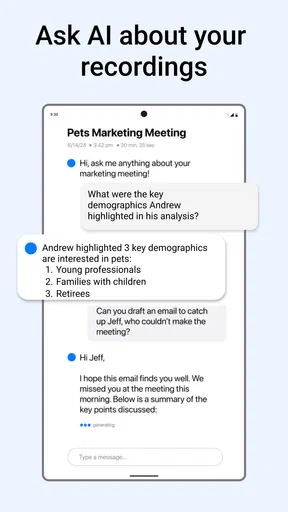
Minutes: AI Meeting Note Taker is designed to help users capture, organize, and review meeting information with less manual effort. It can assist with recording or importing meeting content, generating transcripts, identifying important points, and creating concise summaries or action items. It is useful for work meetings, interviews, lectures, and personal notes, although the quality of its results depends on audio clarity and the languages supported by the app.
Does Minutes record meetings and automatically create transcripts or summaries?
The app’s main purpose is to turn meeting conversations into more manageable notes, but the exact workflow may depend on the device, subscription, and meeting source. Users may need to start a recording, upload an audio file, or provide meeting content before transcription and summarization can begin. Always check that recording is active, review the generated text for mistakes, and remember to obtain consent before recording other people.
Is Minutes: AI Meeting Note Taker free to download and use?
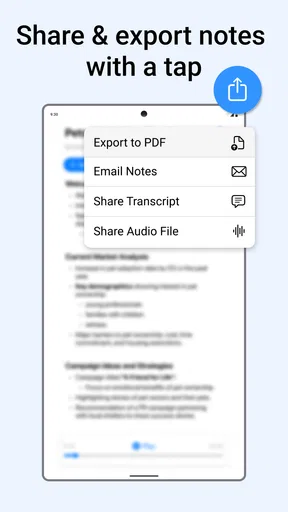
Minutes may be available to download without an upfront charge, but some features can be limited by usage quotas, trial periods, or a paid subscription. Advanced transcription, longer recordings, exports, storage, or AI-generated summaries may require payment. Before starting a trial, review the pricing page and renewal terms carefully, because subscriptions can renew automatically unless they are canceled through the relevant App Store or Google Play settings.
How accurate are the transcripts and AI-generated meeting notes?
Minutes can save considerable time, but AI-generated transcripts and summaries should not be treated as perfectly accurate. Background noise, multiple speakers talking at once, accents, technical vocabulary, poor microphones, and unsupported languages can reduce quality. After each meeting, it is best to check names, dates, figures, decisions, and assigned tasks manually. The app should be used as an assistant rather than the sole official record.
Is my meeting data private and secure when using Minutes?
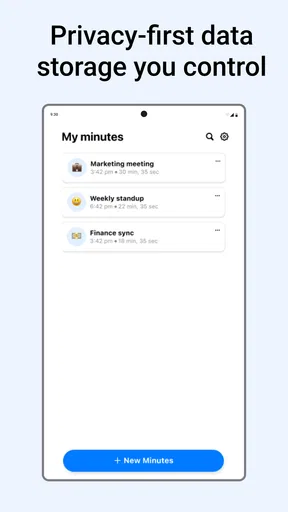
Before using Minutes for confidential discussions, read its current privacy policy and the permissions requested by the app. Pay attention to whether recordings and transcripts are processed on the device or uploaded to remote servers, how long data is retained, and whether information can be deleted or exported. Avoid sharing sensitive meetings until you understand the provider’s security practices, and obtain permission from participants before recording or processing their conversations.
